My productivity system
Table of Contents
My productivity system
A few days ago, at the start of work, I was reviewing my journal and talking with a dear coworker about it and what made it so significant for me. It made me think that I’ve been using my current system consistently for long enough to be able to write about it and share what I think about it more publicly.
Method
I only use the task management system I’ll write about for personal matters. For work, the system is quite different and particular enough to our circumstances I don’t wanna write about it.
Tools
These are the tools I use:
- A physical notebook. In my case it’s a Leuchtturm 1917 in a notebook cover. I write in it with my Pilot Vanishing Point.
- My trusty handbag. As an autistic person, having it consistently stocked and literally always with me is a load-bearing part of the system. In my case it’s a “Great Sport (R) Lenny Lan Design” or whatever.
- Proton Calendar: Web version for my PC, and app version on my phone and iPad.
- Apple Clock app
Bullet Journal
My main system is based on the “Bullet Journal Method”, with a dash of the “Getting Things Done” system thrown in (see [[#References]]).
My notebook is the bullet journal in question. Many bullet journalers have elaborate and beautiful decorations and layouts and tables throughout. I have no artistic talent whatsoever, so my pages are utilitarian and, essentially, plaintext. I usually don’t even use tables.
For the very start, I picked up a couple neat tricks from a YouTube video. The first is, on the cover of the notebook, I have three labels: one with my name, one with the date I started the notebook, and one for the date when i finish using it. This preparation makes future archiving much easier. The second is keeping a very small stack of sticky notes on the inside cover so I can jot down things I need to give out quickly.
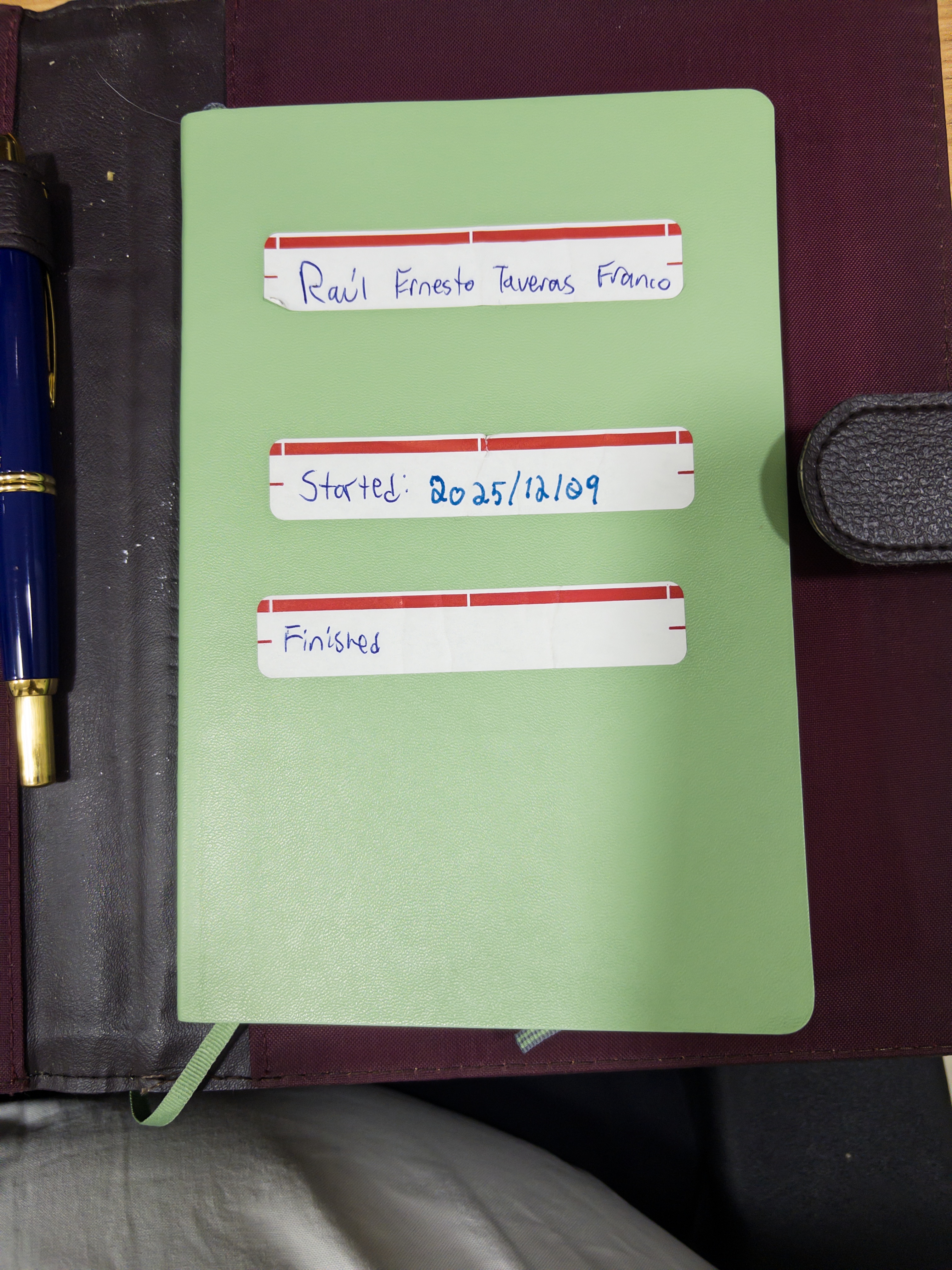
As most bullet journals, mine starts with a two-page spread reserved for an index. The Leuchtturm1917 has a comfortable pre-made spread just for this. Following this, I have one page reserved for the future log, but I find I’m barely using it.
The first concrete sections are my monthly logs. As in the BuJo book, these are two-page spreads: the left page is a calendar view, with one day per line. The right page is a task view, where I write tasks for the current month carried over from the previous month or from the future log. It so happens that my pages have 28 lines, not 31, so I nibble a few lines from the right page to house the overflow days. I usually don’t have a whole page’s worth of tasks in the monthly log anyways.
In the calendar view, I’ve liked following Carroll’s own stated practice of writing it retrospectively. At the end of each day I write one or at most a couple of important things that happened (past tense) that day. The descriptions have to be concise since I only have one line to fit them. If I find it useful, I may draw a smiley or frowney face. It makes it so I can look back at my month and actually remember moments worth remembering.
Moving on to the meat of the system: the daily logs. I keep it dead simple. They are nothing more than rapid logging as described in the book: a heading for the date and short descriptions of things worth moving out from my brain, written as they occur to me. I don’t dedicate whole pages to each day and just leave a blank line between last day’s item and today’s heading. I don’t write upcoming days ahead of time. Everything is written in today’s log and if it needs moving to tomorrow, I move it when I prepare tomorrow’s log. If it needs scheduling for a day beyond that, I write rewrite it in the monthly log or the future log when I do the end-of-day cleanup.
As to the contents, in my case, it’s mostly tasks. I occasionally write about notable events or thoughts if I find them important enough, and I write FYI’s (dashed items) even more rarely. Those items usually naturally belong somewhere that isn’t my journal.
Complementary spreads
Those are the core of the system, so now we can talk about the complementary pages. This February 2026 I started an exercise tracker, which is essentially written markdown: a heading for the month and list items for each exercise day. Since I’m currently following the “Starting Strength” powerlifting program, this is currently just writing down the weights for each of the lifts I did. When I had to take quite a list of pills, I dedicated a page to a weekly medication tracker. Remembering to take pills on schedule is hard enough and autism doesn’t make it any easier. As for project trackers, I rarely use them. I’m not doing anything outside of work that requires that granular foresight and, since I spend most of my time checking daily logs, I find the project trackers get a bit lost for me. Maybe that’s just executive dysfunction doing its thing: the less friction, the fewer pages I have to flip, the better.
Calendar
After that introduction to the notebook side, we can get to my calendar or schedule side. The integration between the two is where GTD’s influence shows itself. Since I’m neurally wired against time blocking, my notebook task lists are not given a scheduled time beyond “do it today if you can”. The few things that have true deadlines, and appointments –in other words, things that “must be done that day or not at all”– these go in my Proton Calendar. I’m bad enough at making appointments that I aggressively decline other responsibilities to make certain I can be there.
Other things I put on it are, generally, recurring events or dates I nonetheless want to make sure I can refer to in case I forget. These include birthdays, holidays, liturgical dates and times, annual celebrations like international days, or personal anniversaries.
Benefits
This type of notebook is extremely helpful for executive dysfunction like mine. Since I have a natural difficulty with task planning, I break down tasks into really, really small actionable chunks. For example: If I need a medical appointment, I will have a task “find out about a doctor” if it’s not one I have a regular for, or “check who is my doctor” if it’s something I do. “Make appointment” is a task I only write down after the first is done.
A second benefit is that the notebook becomes very satisfying to look back on, and good for mental health. If you think to yourself you have not done much, you can look back on your journal and find out exactly how much you’ve done and when. The physical notebook part is extra beneficial, as you can’t NOT look at your monthly calendar view if you’re looking at your monthly task view; or the previous day when planning the next day.
Since I write things down as soon as they come to my mind, I spend very little time in the “urgent + important” quadrant of the famous matrix. Little in my life outside of work is so urgent as to completely throw off my ability to do other things, mostly because everything else is also not so urgent. This means, if something more important comes up and it takes all of my time (which it usually doesn’t), it’s fine, because the other things can be done the next day. And if a task consistently gets put off like this, it’s probably not that important after all. This means I’m living more of a life that aligns with my values and interests.
References
No affiliate links, by the way.
- Ahrens, S. (2022). How to take smart notes: One simple technique to boost writing, learning and thinking (2nd edition, revised and expanded edition). Sönke Ahrens.
- Allen, D. (2015). Getting things done: The art of stress-free productivity (Revised edition). Penguin Books.
- Carroll, R. (2018). The bullet journal method: Track the past, order the present, design the future. Portfolio/Penguin.
- Down the Breather Hole. (2026, January 10). Hack Your Pocket Notebook with These 5 Tips [YouTube]. https://www.youtube.com/watch?v=NWnX3ZkL_eA
- Rippetoe, M., & Bradford, S. (2017). Starting strength: Basic barbell training (3rd edition, 3. revision). The Aasgaard Company.